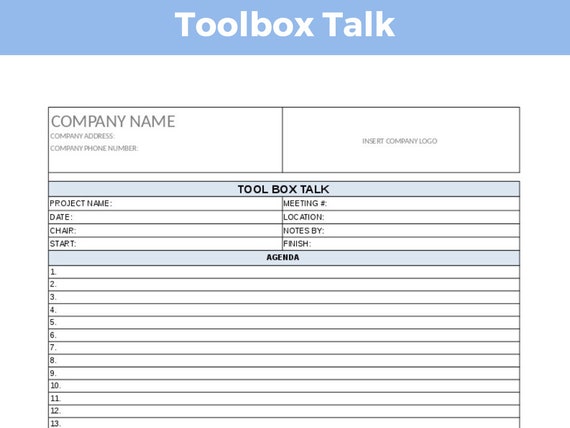
Every day, preventable workplace incidents occur because critical safety reminders get lost in routine. Supervisors rush through verbal warnings, assume understanding, and skip documentation—until an injury happens. A structured, repeatable approach is essential. That’s where a toolbox talk blank template becomes more than paperwork; it’s a frontline defense.
This template standardizes communication, ensures consistent coverage of safety topics, and creates a legal record of training. Whether you’re managing a construction crew, maintenance team, or industrial operation, a well-designed blank template keeps conversations focused, actionable, and compliant.
What Is a Toolbox Talk Blank Template?
A toolbox talk blank template is a pre-formatted document used to guide short, informal safety meetings—typically 10 to 15 minutes—held before work begins. It provides designated fields for key information like:
- Date and time
- Location of work
- Crew members present
- Topic of discussion
- Key hazards identified
- Control measures reviewed
- Signatures for acknowledgment
Unlike generic safety forms, a blank template is intentionally unscripted—ready to be filled in with relevant, real-time content. It’s not a substitute for training but a reinforcement tool that adapts to changing site conditions.
Common use cases include: - Introducing new equipment on site - Reviewing fall protection before roof work - Addressing heat stress during summer months - Reinforcing lockout/tagout procedures after a near-miss
Without a template, these talks become inconsistent. With one, they become measurable, trackable, and defensible.
Core Elements of an Effective Blank Template
Not all templates are created equal. A high-utility toolbox talk blank template includes the following components:
1. Header Information Essential administrative details: project name, job number, supervisor, and weather conditions (if relevant). This ties the session to a specific context.
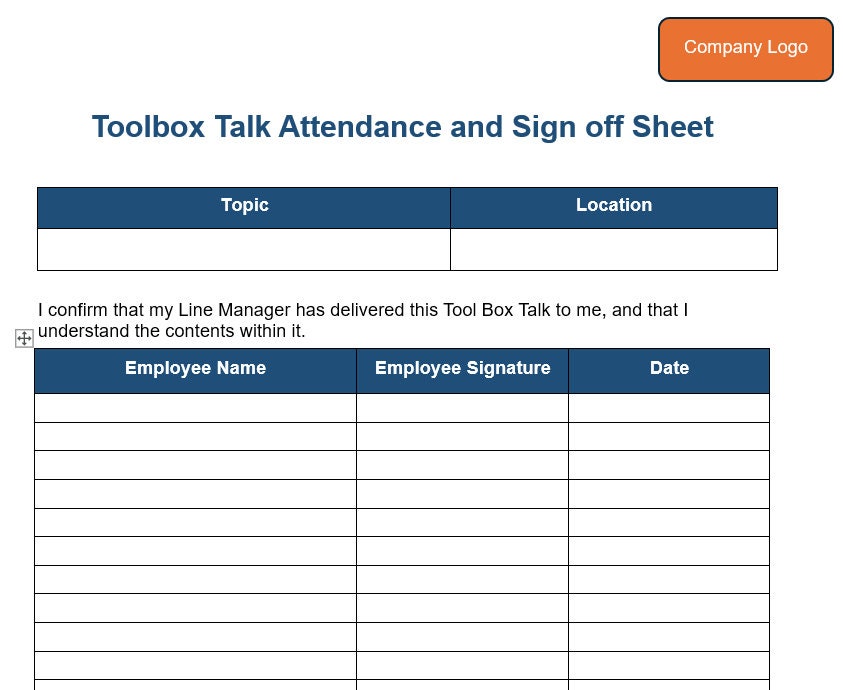
2. Sign-In Sheet Section Lists all attendees with space for printed names and signatures. This proves participation—critical during OSHA audits or insurance claims.
3. Topic Selection Field A blank line or dropdown menu (in digital formats) allowing the lead to specify the day’s safety focus. Examples: “Ladder Safety,” “Hazard Communication,” “Night Shift Awareness.”
4. Hazard Identification Box Structured prompts like “What could go wrong?” or “What are we exposed to today?” guide crews to think proactively.
5. Control Measures Checklist Pre-filled with common mitigation strategies (PPE, barricades, spotters, etc.), this section is marked as applicable. Reinforces accountability.
6. Discussion Notes Area An open field for capturing key points discussed, questions raised, and responses given. Encourages dialogue over lecture.
7. Verification and Sign-Off Final sign-offs by both supervisor and team members. Optional: space for safety officer review.
Pro Tip: Include a QR code linking to related safety data sheets or video resources—especially useful on tech-forward sites.
How to Use a Blank Template in Real-World Operations
A template only works if it fits into actual workflows. Here’s how top-performing teams integrate them:
Step 1: Assign Ownership Designate a safety lead or foreman to prepare and lead each session. Rotate facilitators occasionally to build engagement.
Step 2: Customize Before the Meeting Fill in the topic based on the day’s tasks. If trenching is scheduled, focus on cave-in risks and emergency exits.
Step 3: Conduct the Talk On-Site Hold the meeting where the work happens. Point to real equipment or conditions. Use the template as a visual aid.
Step 4: Encourage Participation Ask open-ended questions: “What would you do if the guard failed on this saw?” Record responses in the notes.
Step 5: Archive for Compliance Store completed forms digitally or in binders by date. Most safety managers keep records for at least one year.
Mistake to avoid: Reading from the template like a script. It’s a guide—not a transcript.
Top 5 Free & Customizable Toolbox Talk Blank Templates
While you can build your own, starting from a proven structure saves time. Below are five reliable options:
| Name | Format | Key Features | Best For |
|---|---|---|---|
| OSHA-Compliant Blank Template (SafetyNow) | PDF & DOCX | Pre-labeled OSHA fields, clean layout, bilingual option | General contractors |
| ClickSafety Free Template | Built-in hazard rating scale, QR integration | Tech-savvy teams | |
| SafetyDocs Template Pack | DOCX | 100+ topic-specific versions, editable fields | Large organizations |
| HSW’s Generic Blank Form | Minimalist design, easy print | Quick daily use | |
| Site Improvement’s Digital Template | Google Docs | Real-time collaboration, cloud storage | Remote supervisors |
Each of these can be branded with your company logo and modified to match site-specific protocols. SafetyDocs stands out for scalability, while HSW’s version wins for simplicity.
Limitation Alert: Free templates often lack version control. Always add a revision date and approval line if using internally.
Common Pitfalls (And How to Avoid Them)
Even with a perfect template, execution can fail. Watch for these recurring issues:
❌ Treating It as a Checkbox Activity
When supervisors fill out the form after the fact—or worse, skip the talk altogether—it undermines safety culture. Fix: Audit random sessions unannounced.
❌ Using the Same Topic Repeatedly Talking about PPE every Monday grows stale. Fix: Rotate topics monthly using a published calendar.
❌ Ignoring Worker Feedback If employees never speak, the meeting is a monologue. Fix: Add a “Team Input” line to the template and reward contributions.
❌ Poor Recordkeeping Lost forms equal non-compliance. Fix: Use cloud storage with folder naming like 2025-MM-DD_ToolboxTalk_[Topic].
Real incident data shows that sites using incomplete or inconsistent templates see 3x higher near-miss rates than those with disciplined follow-through.
Making the Template Work for Compliance

Regulatory bodies like OSHA don’t mandate a specific format—but they do require documentation of safety training and hazard communication. A blank template helps meet these standards:
- 29 CFR 1926.21(b)(2): Requires employers to instruct employees in recognition of hazards.
- 29 CFR 1910.147: Mandates periodic review of lockout/tagout procedures.
- NIOSH Guidelines: Recommend frequent, short safety interactions over infrequent long sessions.
By maintaining an organized log of completed talks, you create a defensible history. In the event of an inspection or incident investigation, signed templates demonstrate due diligence.
Insight: During a 2023 OSHA audit in Texas, a contractor avoided penalties solely because they could produce six months of signed, topic-varied toolbox talk records.
Digital vs. Paper: Choosing the Right Format
While traditional paper templates are still widely used, digital versions are gaining ground.
Paper Templates: Pros: No tech required, easy to sign, familiar workflow Cons: Hard to search, prone to loss, no automated reminders
Digital Templates: Pros: Cloud backup, searchable archives, mobile access, integration with EHS platforms Cons: Requires devices and training, potential downtime if offline
For mobile crews, apps like iAuditor or SafetyCulture allow teams to complete talks on tablets, attach photos, and auto-generate reports. However, in areas with poor connectivity, paper remains reliable.
Hybrid Approach: Print the template for the meeting, then scan and upload it immediately after.
Finalize, Use, Improve
A toolbox talk blank template isn’t a one-time download—it’s a living part of your safety system. Start with a proven format, implement it consistently, and refine it based on team feedback and incident trends.
The best templates evolve: adding new hazard prompts, integrating near-miss reporting, or syncing with scheduling tools. But the core remains the same—clarity, consistency, and conversation.
Download a reliable blank template today. Fill it out tomorrow morning. And make safety something your team talks about, not just signs off on.
FAQ Where can I get a free toolbox talk blank template? Reputable sources include OSHA’s website, SafetyNow, ClickSafety, and HSW. Most offer free PDF or Word downloads.
Do all employees need to sign the template? Yes. Signatures confirm attendance and understanding. Unsigned forms reduce legal protection.
How often should toolbox talks be held? Weekly is standard, but increase frequency during high-risk tasks or after incidents.
Can I reuse the same template for different topics? Yes—that’s the purpose of a blank template. Only the topic and discussion details change.
Should the template be in the employees’ native language? Absolutely. OSHA requires that safety communications be understood by all workers.
What happens if I don’t use a template? You risk inconsistent training, poor documentation, and non-compliance during audits.
Can digital signatures be used? Yes, if the system ensures authenticity and prevents tampering—common in EHS platforms.
FAQ
What should you look for in Free Toolbox Talk Blank Template for Daily Safety Meetings? Focus on relevance, practical value, and how well the solution matches real user intent.
Is Free Toolbox Talk Blank Template for Daily Safety Meetings suitable for beginners? That depends on the workflow, but a clear step-by-step approach usually makes it easier to start.
How do you compare options around Free Toolbox Talk Blank Template for Daily Safety Meetings? Compare features, trust signals, limitations, pricing, and ease of implementation.
What mistakes should you avoid? Avoid generic choices, weak validation, and decisions based only on marketing claims.
What is the next best step? Shortlist the most relevant options, validate them quickly, and refine from real-world results.